
Why People Want to Delete TikTok in 2025
TikTok has become one of the most popular apps in the world, but not everyone wants to keep it forever. Some users worry about privacy, others feel it’s too addictive, while many just want a fresh start.
If you’re wondering:
- How do I permanently delete my TikTok account?
- Why can’t I delete an account on TikTok sometimes?
- What happens when you delete your TikTok account?
You’re in the right place. This simple, step-by-step guide will walk you through how to delete your TikTok account on phone, iPhone, or mobile. We’ll also cover how to delete TikTok without password and whether deleting the app itself removes your account.
Does Deleting the TikTok App Delete My Account?
This is one of the biggest confusions. The answer is no.
When you delete the TikTok app from your phone, your account still exists. Your videos, likes, and profile remain visible to others. Only the app is removed from your device.
If you truly want to delete your TikTok account permanently, you need to go through TikTok’s account deletion process (explained below).
Step-by-Step: How to Delete Your TikTok Account on Mobile (2025)
Deleting TikTok is easy, but many people miss a step and end up only deactivating it instead of fully removing it. Follow these steps carefully:
Step 1: Open TikTok App
- Log in to your account.
- Tap your Profile at the bottom right.
Step 2: Go to Settings
- Tap the three-line menu (☰) at the top right.
- Choose Settings and Privacy.
Step 3: Manage Account
- Under “Account,” tap Manage account.
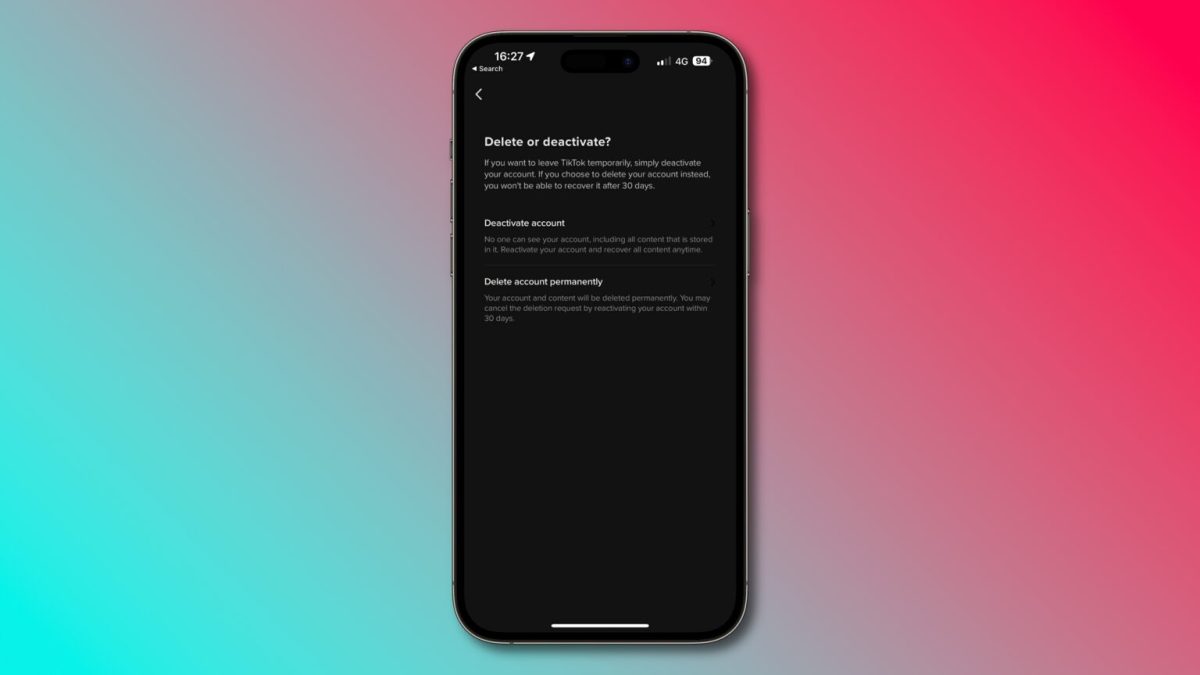
Step 4: Delete Account
- Tap Delete account.
- TikTok will ask why you’re leaving (choose any option).
- Confirm by following the prompts.
Step 5: Final Confirmation
- TikTok will show a warning:
- You’ll lose all your videos and followers.
- Purchases like TikTok coins may not be refunded.
- Your account enters a 30-day deactivation period before being permanently deleted.
Click Continue → Enter your password → Confirm.
Your account is now in the deletion process.
How to Delete Your TikTok Account on iPhone
Deleting your account on an iPhone works the same way as on Android.
- Open TikTok app on iPhone.
- Go to Profile → Settings → Manage account.
- Select Delete account.
- Confirm with your Apple ID or password if asked.
That’s it! The process is identical, but iPhone users may get extra Apple verification steps.
How to Delete Your TikTok Account Without Password
Many people ask: “How do I delete my TikTok if I forgot my password?”
Here’s how you can still delete it:
- On the TikTok login screen, tap Forgot password?
- Reset it using your email or phone number.
- Log back into your account.
- Follow the delete account steps explained earlier.
If you don’t have access to your email or phone, you must contact TikTok support. TikTok needs to verify your identity before deleting your account without a password.
Can You Delete TikTok Without Waiting 30 Days?
Unfortunately, no. TikTok has a strict 30-day grace period. During this time:
- Your account is invisible to others.
- You can still log back in to reactivate it.
- If you don’t log in within 30 days, TikTok permanently deletes your account and data.
This 30-day rule is TikTok’s way of giving users time to change their mind.
Why Can’t I Delete My TikTok Account?
Sometimes people face errors when trying to delete TikTok. Common reasons include:
- Weak internet connection – Try using WiFi.
- Outdated app version – Update TikTok to the latest version.
- Pending verification – If you signed up with email/phone, you must verify before deleting.
- No access to account details – You need to confirm with password, email, or phone number.
If all else fails, contact TikTok Support through the Help Center.
What Happens When You Delete Your TikTok Account?
Before hitting that delete button, here’s what to expect:
- Your profile disappears – No one can search or view your account.
- Videos are gone – All your uploads are permanently removed.
- Followers lost – Your followers list resets.
- Messages deleted – Conversations may still appear for others, but your account shows as “Deleted User.”
- Purchases gone – TikTok coins or in-app purchases are not refunded.
Once deleted after 30 days, there is no way to recover your account.
Quick Guide: TikTok Account Deletion Options
| Method | Works? | Notes |
|---|---|---|
| Delete TikTok app | ❌ No | Only removes the app, not your account. |
| Delete account via Settings | ✅ Yes | Official method (30-day wait applies). |
| Delete without password | ✅ (with reset) | Requires email/phone reset. |
| Delete immediately | ❌ No | TikTok requires 30 days grace. |
Tips Before Deleting TikTok
- Download your data: TikTok lets you request a copy of your videos and activity.
- Withdraw money: If you have creator funds or gifts, cash out before deleting.
- Unlink accounts: If you used TikTok to log into other apps, unlink first.
Want to clean up more of your digital footprint? Check out our step-by-step guide on how to delete your Gmail account.
FAQs About Deleting TikTok Account in 2025
1. How do I permanently delete my TikTok account?
Go to Profile → Settings → Manage Account → Delete Account. Confirm with your password, and wait 30 days for full deletion.
2. How do I fully delete a TikTok account?
You must complete the 30-day deactivation period. After that, TikTok deletes your account permanently.
3. Why can’t I delete my account on TikTok?
This happens due to poor internet, outdated app, or missing verification. Update your app and check your login credentials.
4. Will deleting the TikTok app delete my account?
No. Deleting the app only removes it from your phone. Your account stays active unless you go through the delete process.
5. How to delete your TikTok account on phone?
Open TikTok app → Go to Settings → Manage Account → Delete Account. Confirm and follow steps.
6. How to delete your TikTok account without password?
Reset your password using email/phone, then follow the delete process. If no access, contact TikTok support.
7. How to delete your TikTok account on iPhone?
Same steps as Android: Profile → Settings → Manage Account → Delete Account. Apple may ask for extra verification.
8. How to delete your TikTok account without waiting 30 days?
Not possible. TikTok requires 30 days before permanent deletion.
9. What happens when you delete your TikTok account?
Your profile, videos, and followers are permanently removed after 30 days. Coins and purchases are lost.
Final Thoughts: Should You Delete TikTok in 2025?
Deleting TikTok is a personal decision. For some, it’s about privacy and focus. For others, it’s about taking a break from social media.
The good news is that TikTok makes the process easy and straightforward. Just remember:
- Deleting the app ≠ deleting the account.
- You must wait 30 days before permanent deletion.
- Always download your data and withdraw funds first.
If you’re ready, follow the steps above and permanently delete your TikTok account in 2025.
